
iOS to Android
Posted on 2/18/2026 - hyperdefinedIntroduction
I’ve been an Apple user all my life, ever since I was a very young pup. My first devices were some of the original iPods, Nano, and touch. I’ve used these devices religiously, until I got my first iPhone, which was a hand me down iPhone 4S. I’ve also pretty much jailbroken all iOS devices I’ve ever had. However, I did end up swapping to Android for a few years with the Samsung Galaxy S7. I ended up swapping back to iOS after that phone. That was a very long time ago and unfortunately I do not remember using that phone.
I’ve really loved the Apple ecosystem and design. It’s something that always made me gravitate towards Apple. Everything just worked well together.
However, in the past few years, Android has been on the horizon for me. To me, Apple hasn’t really changed too much about their phones, and getting the “same phone but better” every 2 years (under Verizon) didn’t seem appealing to me. Because of this, Android has been something I’ve looked more into swapping over. As a tech wolf I wanted something different.
Currently
Before swapping, I was rocking these below:
- iPhone 16 Pro
- AirPods Pro 3
- Watch Series 10 (GPS only)
I was pulled into the classic Apple ecosystem. All these devices worked seamlessly (kinda…).
I pretty much used all these devices daily, mostly besides the watch. I really didn’t wear the watch besides being at work. I only used the watch to see if I had any notifications. I never used the features as they weren’t for me. Looking back, I feel like I wasted my money since I never used the features of the watch I paid for.
I wasn’t a super power user of my device. I never took crazy photos using all the camera features. I only used my phone to see social media, text friends, and Spotify.
After a day of usage, I generally hit around 30-40% at the end of the day. I always charge my phone overnight on my wireless charging dock (it charges everything on my list). I sadly did not track my screen time.
Picking a Phone… and New Carrier?
Getting a new phone and swapping carriers were 2 different ideas. They eventually worked out and turned into the same one. For context, I was on a family plan with Verizon for well around 15 years. I figured it was time to swap off of them and move onto my own plan. We had unlimited everything, I honestly don’t know what specific plan or anything.
The first step was to pick a carrier. I looked around with my best friend, who also needed a new phone plan, to see if it was ideal to get a plan together. We both figured more lines would mean more discounts, but with only 2 lines, we really did not see any benefit. You really need a family of 4 for it to matter.
He eventually brought up Mint Mobile. I never heard of them before, but he knew some folks that had them. Their pricing was really good for what I need, just a simple phone line with data. Most of the other major U.S. carriers bundle a bunch of things I simply do not need, which I am paying for and wasting my money on. Mint Mobile had a really good sale for new users and they let you prepare in advance, which was ideal for me.
Picking a new phone was not as hard as I thought. I originally was looking towards a Google Pixel, for that “stock Android” feel. However, I looked more into Samsung and liked their side a little bit more. Looking at their current line up, I was given 3 choices: S25, S25+, and S25 Ultra. I know the S26 is coming out this year, but honestly I do not need the latest phone. These were the options through Mint, and they also had really good sales on those 3.
The base S25 is a bit smaller than my current iPhone, so that was an obvious no. My mentioned friend was also looking to make the jump to Android, and he was eyeing up the S25 Ultra specifically. He wants the better camera, so the Ultra is ideal for him. However that phone is way too big for me and that size jump would be a change. My last choice brings me to the S25+, which is a good middle ground between those two phones and size. It was a bit bigger than my current phone, but it would be nice to have a bigger screen.
On a Friday afternoon, I placed the order for my new phone through Mint.
New Phone Time
On a Wednesday afternoon, the phone arrived! I immediately upon opening the phone installed a glass screen protector and case. Since this was a phone I paid for this time, I am going to protect it. I’ve always had a case and screen protector on my devices in the last 10 years.
I had two goals to accomplish, transfer my content and my phone number to Mint. When I bought the phone, it included 1 year of my selected plan. I just had to transfer and activate the service. The phone itself was unlocked, so I just had to install the eSim once it was ready.
The first step was to get a transfer pin from Verizon. I knew I had to do this already, since I’ve had a few years of experience doing phone activations. My line was paid off, so there shouldn’t be any issues.
However, using the Verizon app to generate the pin, it told me I would be charged $1,300 USD to generate this pin. This didn’t make sense, as the phone was completely paid off. It was paid off a few days ago, and Verizon confirmed the balance was gone when I looked at the line on the app. I looked into calling the automated line, which told me my number was not eligible. Awesome.
We ended up calling Verizon directly, and the support rep on the phone generated a pin and confirmed the line was ready to be transferred. Upon asking him about the random charge to do it via the app, he simply did not know, nice. To be clear, we never were charged that amount. I believe that was a default message stating I would have to pay the rest of the balance to transfer out. I believe it never checked and showed the original phone balance. I got the pin and set up my Mint account.
I had no issues setting up the account, and my phone number transferred perfectly fine. This setup and transferring only took at most 10 minutes. It was now time for the other step, setting up the phone.
I did cheat a little and did the transfer while we were on hold, which ended up failing. It never notified me the transfer failed, so I tried it again, which failed. What I ended up missing was I needed the Samsung Smart Switch app on my iPhone, which the new phone never told me about. Or it just happened to fail twice, but installing this app made it work.
It copied over my contacts, texts, and photos. I figured I would redownload my apps manually, since I wanted to downsize the apps on my phone.
The Android Experience
Now that I have the phone setup with my new line, let’s set up the phone. It was honestly easy, and I didn’t have any issues besides the original transfer failing.
I spent the rest of the evening downloading my apps and signing in. At the end of the night, my phone was pretty much ready for the next day. The next day was a work day, so it was the real “test.”
My AirPods worked flawlessly and still do. Even my car’s smart features seem to work a bit better? I had some issues with CarPlay simply not working, or just my iPhone’s bluetooth in general. However, I’ve had zero issues with Android Auto.
One thing I was torn between was either swapping between the dedicated navigation buttons at the bottom or swipe gestures. I was already used to swipe gestures from iOS, but I really liked the dedicated navigation. In the end, I set on the gestures.
I really loved the customization Android offers, and I spent some time going through each option in the settings app to configure everything.
The fingerprint reader also seemed to have a lot of issues when I first set up the phone. I must have done the setup wrong, because after redoing it, it works 99% of the time now. The face unlock also worked very well, but I did swap back to the fingerprint.
A random small issue I faced was figuring out how to see my media controls on the lockscreen. There were no controls when I used my music app at all. I looked around online, and people said to add a widget, which I really didn’t want to do. Is there really no built-in media controls on the lockscreen?
Turns out when I was changing some settings around, specifically under the “Now bar,” I turned off media controls. I turned off the “Now bar” stuff because I didn’t want the AI stuff, but I went through and turned off everything without reading it. Wolf brain moment.
Overall, the experience was great. Phones are so similar these days nothing was mindblowing, but it was definitely a nice refresh for my daily device.
iMessage Issues
Since I swapped, I needed to turn off iMessage on my Apple account. I read a lot about this before, so I knew I had to do this. I did turn off iMessage while I had the iPhone.
After swapping, I asked my family to make sure they can text me. However, we both were having issues sending/receiving. I figured their phones did not recognize iMessage was off yet. Even waiting a few hours didn’t fix it.
The fix for me was to go to the “Deregister iMessage” page on Apple’s site. Simply entering my phone number and verifying forced my number to be deactivated from iMessage. After waiting a few minutes, texts started to work just fine!
RCS messages are awesome, literally all my family and co-workers who I text all use iMessage, and the compatibility has been really good. Reactions work well, and our groupchat does too.
Customization!
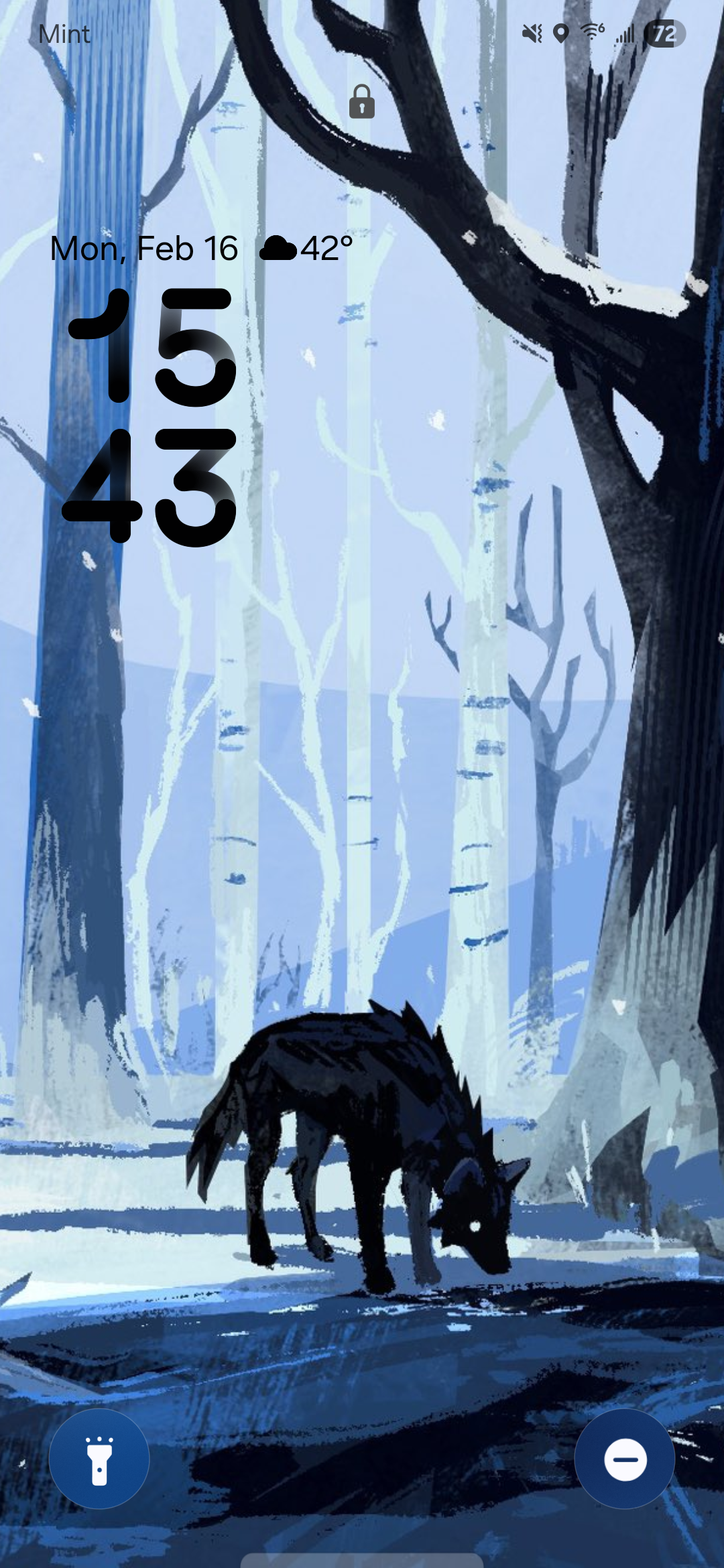
What I was really excited for was customization. One of the first things I did was change my lockscreen. I was really happy with being able to change how the date/time is formatted, the fonts, and even where it sits on the screen. I also loved how I can use almost any wallpaper compared to iOS. iOS does weird cropping/zooming in on photos, and does the “extended display” if you move the wallpaper certain ways. Being able to use a full photo for customization is great.
I also like having my notifications use the “lighting effect.” I have it set to the glitter one, which adds a rainbow border on popup notifications around the phone. Small things like this for me add a lot to my phone.
I haven’t messed around with icon packs or launchers yet. I remember I used to on my original Galaxy S7, but I haven’t done any of that yet. Definitely in the future I will.
Galaxy Watch
What do I do with my old Apple Watch? Well, I sold it on eBay and got some money back for it. I didn’t get a great return, since it was just the watch and charger (no box, no band). The next goal was to look for a new watch.
I was picking between the Galaxy Watch 7 or 8. I wanted the 8 since it was the newer generation, but the price and design pushed me away. The 8 was a weird “not full circle” shape. I really liked the full circle shape of the 7, and the price was cheaper for what I used the watch for, so I got the 7.
Setting up the watch was easy, and I really love the circle design. It looks like a real watch and was a bit more stylish.
The watch honestly is a lot better than my Apple Watch. I remember my Apple Watch having this weird issue with notifications. When I wake up in the morning, I clear my notifications from my phone. When I put my watch on, it tells me I have new notifications (with the red dot indicator). However, it was all the old notifications I got from overnight, the ones I already cleared. The Galaxy Watch does not have this issue, and the notifications sync a lot better.
The media controls seem a bit better. When I use my music app, it automatically launches the controls on the watch (I enabled this I believe) so I can control my music without grabbing my phone. This is great for me at my job, where I can focus on my work and change my music very easily. I’m sure my Apple Watch did similar, but it never seemed as intuitive as this.
I really liked the watch faces it comes with. I like being able to change the font and display of certain things, like my lockscreen.
Overall, paying a much lower price for a smart watch that I use a little bit more is better justified to me compared to buying a super pricey Apple Watch. No hate, just not for me since I didn’t use any of the features.
Ownership & Mint
As mentioned earlier, I fully own this phone and my phone plan. I’ve always been on my family’s plan, and was offered to not have to pay (thanks Mom and Dad). However, I am an adult and needed to move off at some point.
I believe my line was around $70 a month with the phone and line. My line wasn’t a dedicated line, it was a “sub/secondary” line, so the price wasn’t too high.
For my new plan, I paid $180 for unlimited talk/text/data for 1 year. I paid $550 for the phone due to the sale from Mint. I put this money upfront, so now I do not have a phone bill for a year. For the next payment, my bill is $360 for 1 year, but I might downgrade that to their 20GB plan, since I do not use a lot of data.
Owning a phone that is fully paid off, I am good for a few years. Samsung promised 7 major updates, so I am set for the future. I don’t need to worry about upgrading until the phone literally dies.
Network coverage has improved, especially at my job. Verizon in that area has not great service, but it worked. It would usually be LTE only and sometimes 5G but at low signal strength. Mint uses T-Mobile, and I’ve noticed service in this area is better, still not 100%, but definitely better. At my house, I use WiFi but I always have full signal on both carriers.
I haven’t traveled anywhere else yet, but I am excited to go to Canada in the future. I had a lot of issues with Verizon roaming, so I will be excited to see how Mint works. My new plan does offer free roaming in Canada. I do only get 3GB/month of data, but I can purchase more right from the app.
1 Month Later
I wrote the top part of this blog post a month ago, and I thought I would give the 1 month update. Honestly, not much. It’s been about the same as the first week.
One little issue with the watch was notifications popping up the full conversation view. If I had my wrist position in a way the watch thought I was looking at it, notifications would pop up and stay on screen with the full conversation. I really didn’t like this, as notifications are something I will come back to, not see right away. Even moving my entire arm down to “dismiss” the watch, it would still be there when I checked it again.
I “fixed” this by disabling “Show details automatically when checking notifications after an alert” under “Advanced settings” in the notifications section of the Wearable app. However, this now makes the notification still sit on top of the watch, but only the app or person I got the notification from. I guess this is fine, but I would like this feature to be fully off.
What I’ve Missed
The only thing I really miss is my AirPods quick connecting. I usually now have to manually connect under the bluetooth settings. Other than that, I haven’t really missed anything that I can think of.
Conclusion
Overall, the swap has been great. It’s really nice seeing a new refresh of my daily device. Being on my own phone plan and my own device for the first time is great. I am excited to use this phone for the next few years and see what my options are when I swap to a new Android device.